Jul 30, 2026
Comments
Python mobile app development reaches iOS in Qt 6.12. PySide6 developers can ship native iOS apps from the same codebase they already use for Android and desktop, with no Swift or Objective-C rewrite and no second codebase to keep in sync.
Since Qt 6.5 brought PySide6 applications to Android, a natural question has been: what about Python on iOS? iOS presents a fundamentally different challenge than Android, but with Qt 6.12, Python developers can ship to iPhone and iPad without leaving the PySide6 ecosystem for another Python-to-iOS toolchain.
Can you Build iOS Apps with Python?
Yes 🎉. As of Qt 6.12, PySide6 applications can run natively on iOS. Cross-compiling PySide6 for iOS produces a set of static .a libraries. Those static libraries are linked directly into the app's Xcode project alongside Qt's own static frameworks and BeeWare’s Python.xcframework (until Python 3.15 is released, which will provide official iOS support), so everything ends up in one final app binary instead of being loaded dynamically at runtime.
Why Does iOS Need a Different Approach than Android?
iOS requires Qt to be statically linked into the application binary. Qt ships as static libraries for iOS rather than shared dylibs. If PySide6 modules were loaded as dynamic files, Qt's symbols would appear twice, and this would cause duplicate symbol errors at load time.
The solution is to statically link every PySide6 module into the binary and pre-register them with the Python interpreter before Py_Initialize.
How Does Qt Take Over the iOS app Lifecycle?
iOS applications are driven by UIApplicationMain, which takes over the process and never returns. Qt's iOS platform plugin provides qt_main_wrapper, which calls UIApplicationMain with Qt's own application delegate, making the full Qt platform integration available, including signals, slots, and the event loop. We set Xcode's LD_ENTRY_POINT build setting, so Qt owns the process from the start.
Qt's run-loop-integration then hands control back to our main(), which initializes Python and runs the application script.
How do I run a PySide6 app on iPhone or iPad?
Getting a PySide6 app running on iOS takes three steps: complete the prerequisites, cross-compile PySide6 once per Qt version or download wheels via qtpip, then use the pyside6-ios-deploy tool to generate the Xcode project.
Step 1 - Prerequisites:
A full Xcode installation with the iOS platform SDK. The standalone Command Line Tools package isn't enough; the generated project is built with xcodebuild against Xcode's iOS SDK and simulator runtimes.
An Apple Developer Team ID for physical device builds only; simulator builds don't need one.
Python.xcframework, downloaded automatically on first run (or point at your own with --xcframework-path).
A PySide6 and shiboken6 wheel built for iOS: downloaded pre-built or produced by the cross-compile step below.
Step 2 - Cross-compile PySide6:
python pyside-setup/tools/cross_compile_ios/main.py --qt-install-path ~/Qt/6.12.0
This downloads Python.xcframework, generates a CMake toolchain file, and cross-compiles shiboken6 and PySide6 for ios_arm64 by default, producing static libraries for a physical device. Add --simulator for the simulator (ios_arm64_simulator), or --arch x86_64 for an Intel simulator build (ios_x86_64_simulator, --simulator implied).
Each run targets one architecture and platform, so building for both device and simulator means running it twice. Do this once per Qt version and target; reuse the output across all your iOS apps.
Step 3 - Generate and build the Xcode project:
pyside6-ios-deploy /path/to/main.py --name “<AppName>” --wheel-pyside=/path/to/PySide6_wheel --wheel-shiboken=/path/to/shiboken_wheel
open deployment/<platformTag>/<AppName>.xcodeproj
This generates:
main.mm: Initializes Python, registers all PySide6 modules as built-ins, runs the Python scriptInfo.plist: iOS app metadataproject.pbxproj: links all Qt frameworks, PySide6 static archives, Python.xcframework, and iOS system frameworks; setsLD_ENTRY_POINT
From Xcode, select your device and press Run ▶️.
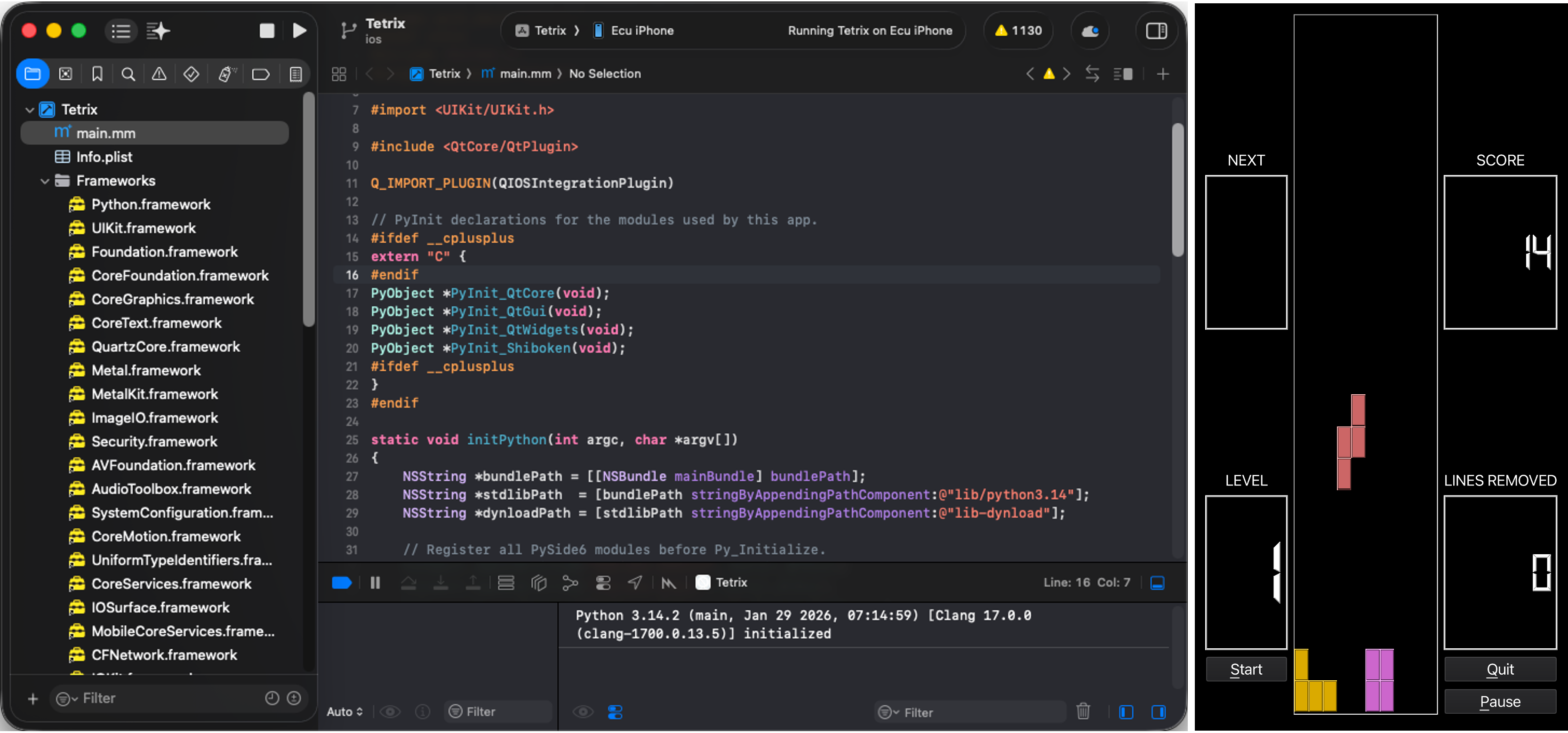
Figure 1: Xcode Project (Left), Device screenshot (Right)
One Codebase for Android and iOS
With PySide6 now targeting both Android (since Qt 6.5) and iOS (since Qt 6.12), the same PySide6 codebase can target both major mobile platforms. The build and packaging steps differ under the hood, static linking on iOS versus dynamic loading on Android, but your application code doesn’t need to change between them. A single PySide6 project, deployable to desktop, Android, and iOS without a rewrite.
PySide6 on iOS: Current Limitations
Considering this is the first version that will include iOS deployment support, we have identified a few limitations that you need to be aware of. If you believe you can contribute a fix of any of the following items, we will be happy to review them.
- No third-party packages yet. Pure-Python packages can be dropped into your project folder and will import, but there's no supported way to declare them as a dependency, and non-.py files like data files and .dist-info metadata aren't picked up. Packages with C extensions (numpy, Pillow, etc.) can't be used at all: desktop PyPI wheels don't work on iOS, and no iOS wheel index exists yet.
- No way to trim permission usage strings. All six Darwin permission plugins (camera, microphone, Bluetooth, contacts, calendar, location) are statically linked into the PySide6 wheel at cross-compile time, so pyside6-ios-deploy can't detect per-app usage and declares all six NS*UsageDescription keys with generic text regardless of need. Harmless at runtime, but Apple's App Review flags unused capability declarations, so trim and rewrite the purpose strings as a release step and keep that edit outside the generated directory since it's regenerated on every run.
FAQs
Can you make iOS apps with Python?
Yes. Using PySide6 and Qt 6.12 or later, you can statically compile a Python application into a native iOS app binary and run it on iPhone or iPad. It requires cross-compiling PySide6 for iOS and generating an Xcode project, but the application code itself is standard PySide6.
Are there other ways to develop iOS apps with Python besides PySide6?
Other Python-to-iOS toolchains exist for example, BeeWare's Briefcase, as well as kivy-ios package, but PySide6 is the option that gives you the full native Qt widget and QML toolkit.
Does Python support cross-platform mobile development?
Yes, with PySide6 you can now target both Android and iOS from the same PySide6 codebase. The underlying build process differs by platform (Android uses dynamic library loading; iOS requires static linking), but application logic and UI code can be shared across both.
What are the current limitations of Python on iOS?
The main gaps: no supported way to add third-party packages yet, and no way to customize the permission usage strings Apple requires, since PySide6 statically links all six Darwin permission plugins, Info.plist declares camera/microphone/etc. usage text regardless of need. For the full, current list, see the pyside6-ios-deploy documentation.
Do I need to know Swift or Objective-C to ship a PySide6 app to iOS?
No. The generated Xcode project handles the native iOS entry point and app lifecycle for you (main.mm, Info.plist, LD_ENTRY_POINT). Your application logic stays in PySide6; you only need Xcode to build and sign the app, not to write native code.
Where can I Find PySide6 to Test it Out?
The tooling lives in pyside-setup/tools/cross_compile_ios/.
For the full API reference beyond what's covered here, see the official Qt for Python documentation. If you want to see how this same PySide6 approach already works on Android, check out Qt for Python on Android: cross-compiling with pyside6-android-deploy for the parallel workflow.
Feedback, bug reports, and questions are welcome on the Qt bug tracker under the PySide component.
Thank you to Patrick Stinson, who did the initial exploratory work on getting PySide6 running on iOS. Our approach here ended up different from his, but that early groundwork helped get this effort started.
Blog Topics
Related Articles
Qt for Python Release: 6.12 is here!
Qt for Python 6.12 is here, alongside the Qt 6.12 LTS release. This is the..
Read Article
Qt Extension 1.16.0 for VS Code Released
We're excited to announce the release of version 1.16.0 of the Qt..
Read Article