Sep 29, 2026
Comments
The Challenge: Getting AI Agents to Draw Correct Canvas2D
Qt 6.12 introduces Qt Canvas2D. Its API echoes the HTML5 canvas and the older Qt Quick Canvas element, both of which developers and AI models have seen many times in training data.
But since the goal of Canvas2D is not 100% HTML5 canvas compatibility, when using AI agents to draw a UI, that familiarity becomes a problem: an agent asked to draw a gauge or a real-time oscilloscopes will confidently reach for features that don't exist in Canvas2D - clipping the drawing to an arbitrary shape, drawing dashed lines, reading pixel colors back from the canvas, or adding a soft drop shadow.
The result compiles, sometimes runs, and is wrong in ways that only surface at runtime - a black square where a transparent overlay was expected, or a shape mirrored across the wrong axis.
Enter the Canvas2D Agentic Coding Skill for Embedded Device UI Development
The new Canvas2D coding skill closes this gap by giving the AI agent an authoritative API reference and a set of rules distilled from the module's actual runtime behavior, rather than relying on pattern-matching against HTML canvas code or making expensive Qt documentation calls. It covers project setup, the GPU-side painting model, save and restore discipline, path2d caching for performance, and a clear list of what is simply not available - with the correct replacement for each.
The skill activates whenever 2D canvas related work is in the subject: writing, reviewing, fixing, optimizing, or porting canvas drawing code.
Key Capabilities of the Canvas2D Coding Skill:
-
Accurate API grounding - every ctx call is checked against the real Canvas2D surface, not remembered HTML canvas behavior.
-
Correct defaults - fillColor and alphaBlending are set deliberately instead of leaving a canvas as an opaque black rectangle.
-
Performance through path2d - persistent geometry is cached in GPU-side path groups and instanced by transform instead of rebuilt every frame.
-
Porting guidance - dedicated rules for moving code from Qt Quick Canvas, HTML5 canvas, or QCanvasPainter C++.
-
19 runnable recipes - from static shapes and bar charts to radial gauges, oscilloscopes, analog clocks, and pan/zoom viewports.
The Recipe Library
The skill holds 19 runnable implementations covering the common canvas cases, each demonstrating a different combination of rules from the skill. Adapt the closest one instead of starting from a blank canvas or learn from them as example implementations. The following code examples are available:
• static-shapes.qml - one-shot painting, primitives, fill rules, holes, save/restore
• animated-line-chart.qml - FrameAnimation loop, grid pattern backdrop, gradient area fill, cached axis path
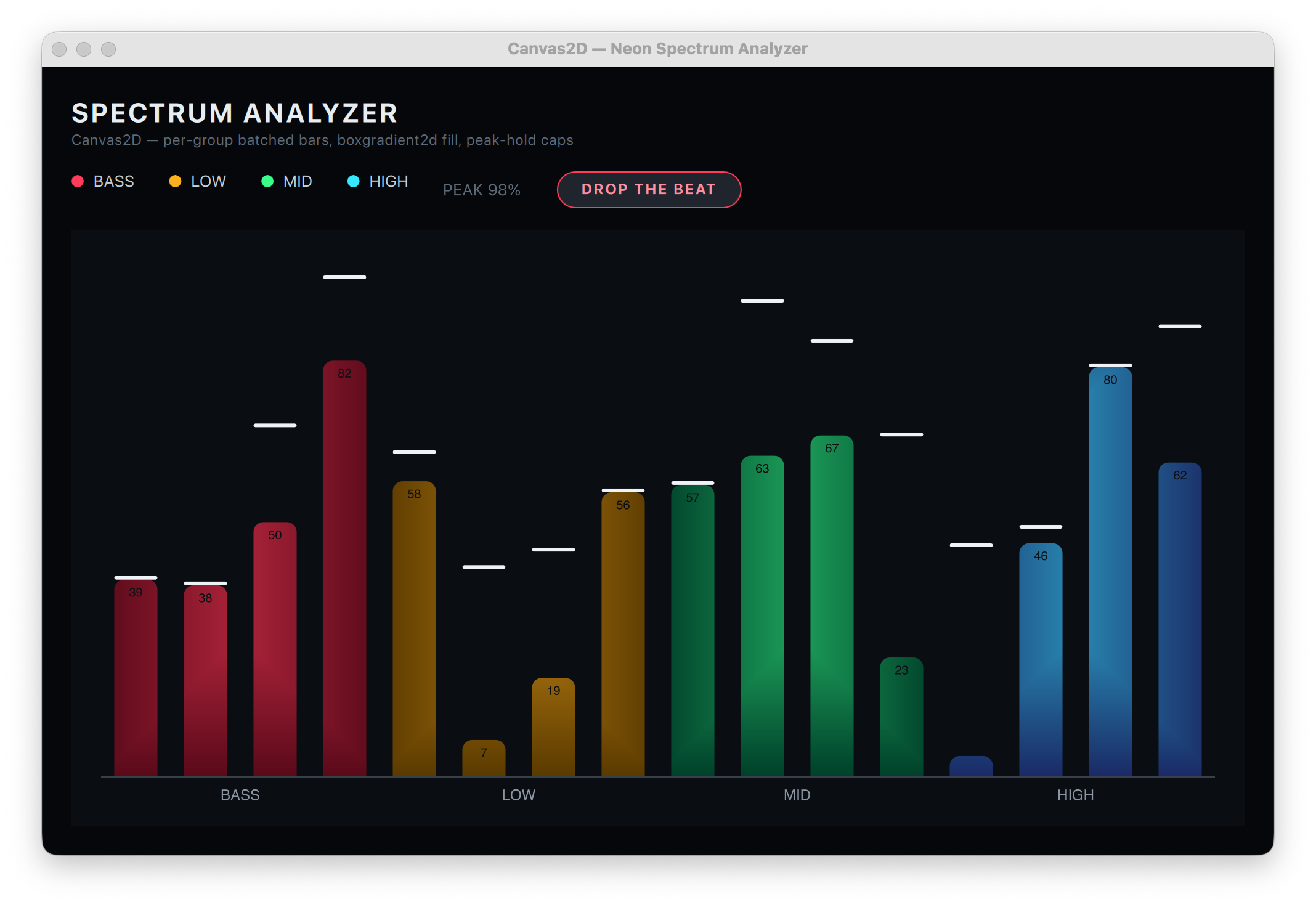
• bar-chart.qml - batched rect() path, box gradient bars, value labels, measured text
• pie-donut-chart.qml - annular-sector wedges, conical sweep variant, legend, centred text
• scatter-plot.qml - path2d marker instancing with a path group, thousands of points
• radial-gauge.qml - conical gradient arc, tick ring cached in a path group, needle, box shadow
• progress-ring.qml - animated arc, round caps, behavior-driven value, centred label
• analog-clock.qml - transform stack, cached tick paths, smooth sweep hand, shadowed bezel
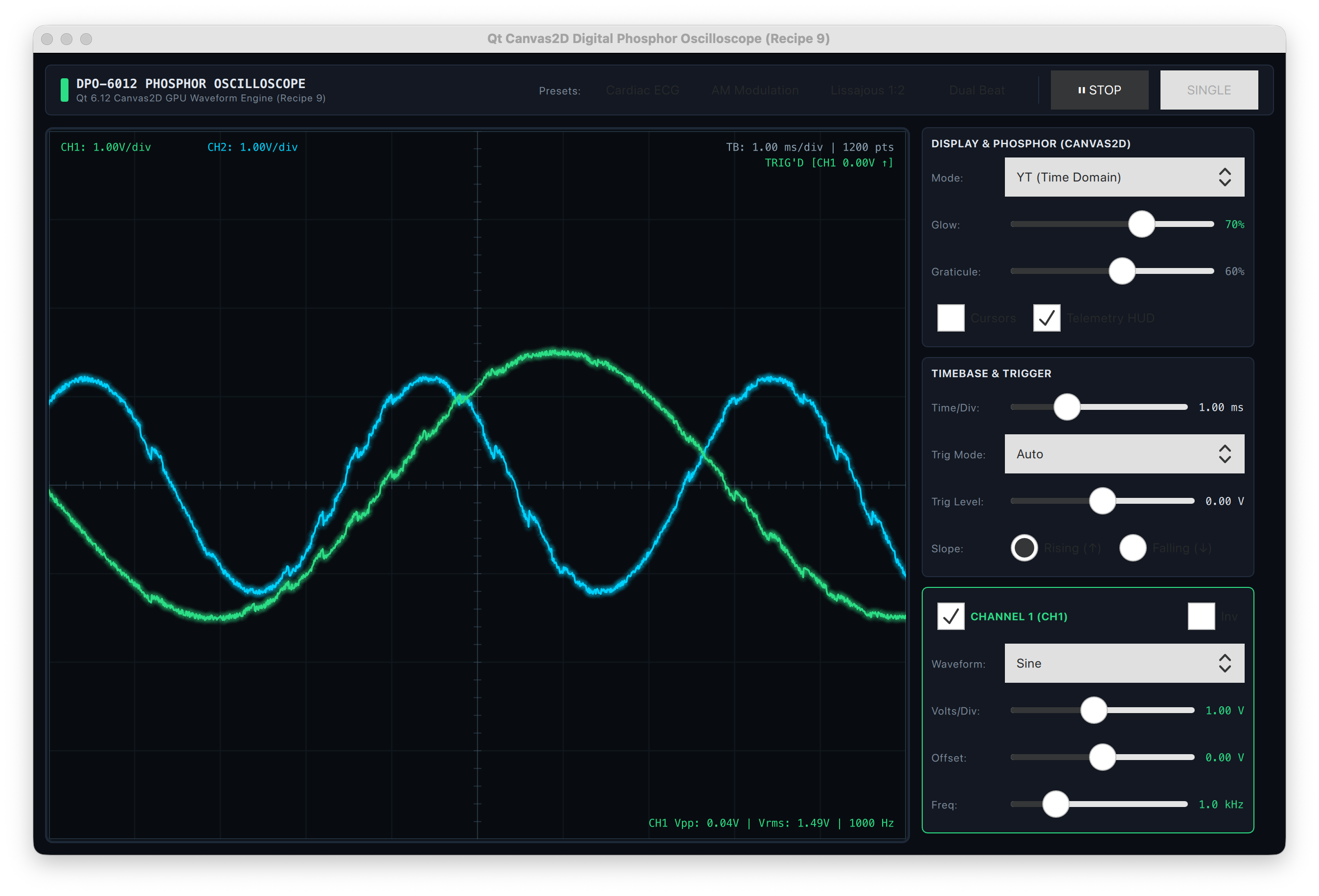
• oscilloscope.qml - ring buffer, 1000+ segment polyline per frame, antialias glow pass
• node-link-diagram.qml - bezier links, node instancing, drag and hit testing without pixel-based hit tests
• freehand-drawing.qml - persistent path2d strokes, pointer input, cached committed strokes, undo
• text-panel.qml - font, alignment, baseline, wrapping, line height, measured text, text direction
• images-and-patterns.qml - image loading, drawImage overloads, image pattern, tinting
• shadowed-card-button.qml - box shadows, per-corner radii, hover/press states, hit testing, accessibility
• color-effects-and-clipping.qml - global alpha/brightness/contrast/saturation, composite modes, rectangular clipping
• pan-zoom-viewport.qml - transform2d camera, world-space cached paths, level of detail, screen-to-world inverse
• level-meter.qml - batched rect zones, cached segment bed, frame-rate-independent peak decay
• sparkline-delegate.qml - canvas per ListView delegate: reuse handling, and when one shared canvas wins instead
• rotary-knob.qml - drag/wheel/keyboard continuous control, cached tick ring, focus ring, accessible dial role
The Skill's Focus on 2D Canvas Painting
This skill is scoped tightly to the canvas item itself: the onPaint function, drawing calls, and canvas-level properties. It does not cover the surrounding QML component structure, imports, property bindings, or Window/ApplicationWindow setup. For that, the skill defers to and recommends invoking the qt-qml coding skill alongside it whenever the task touches QML outside the canvas item.
Tested with
The skill has been tested with Claude Code CLI with Claude Sonnet 5, Github Copilot with GPT 5.6 Sol + Gemini 3.8 Flash, and Qwen Code with GLM 5.2 + Qwen 3.8 Max.
Where can I get the skill?
The Canvas2D coding skill is available via the Qt agent skills GitHub repository or the Claude qt-development plug-in, alongside the QML coding skill, the QML profiler skill, and other Qt-specific agentic capabilities.
Blog Topics
Related Articles
Updated Qt Code Review Skills Reduce Token Costs by Up To 75%
Whether you are reviewing Qt Quick or Qt Widget code with Qt’s agentic..
Read Article
Qt Creator 21 - CMake Changes
Here are the new CMake changes in Qt Creator 21: Editor Qt Creator 21..
Read Article
Qt Creator 21 Beta2 released
We are happy to announce the release of Qt Creator 21 Beta2. Please head..
Read Article