We surveyed 420 embedded UI/UX designers. Here's what we found about their challenges, tools, and workflow.

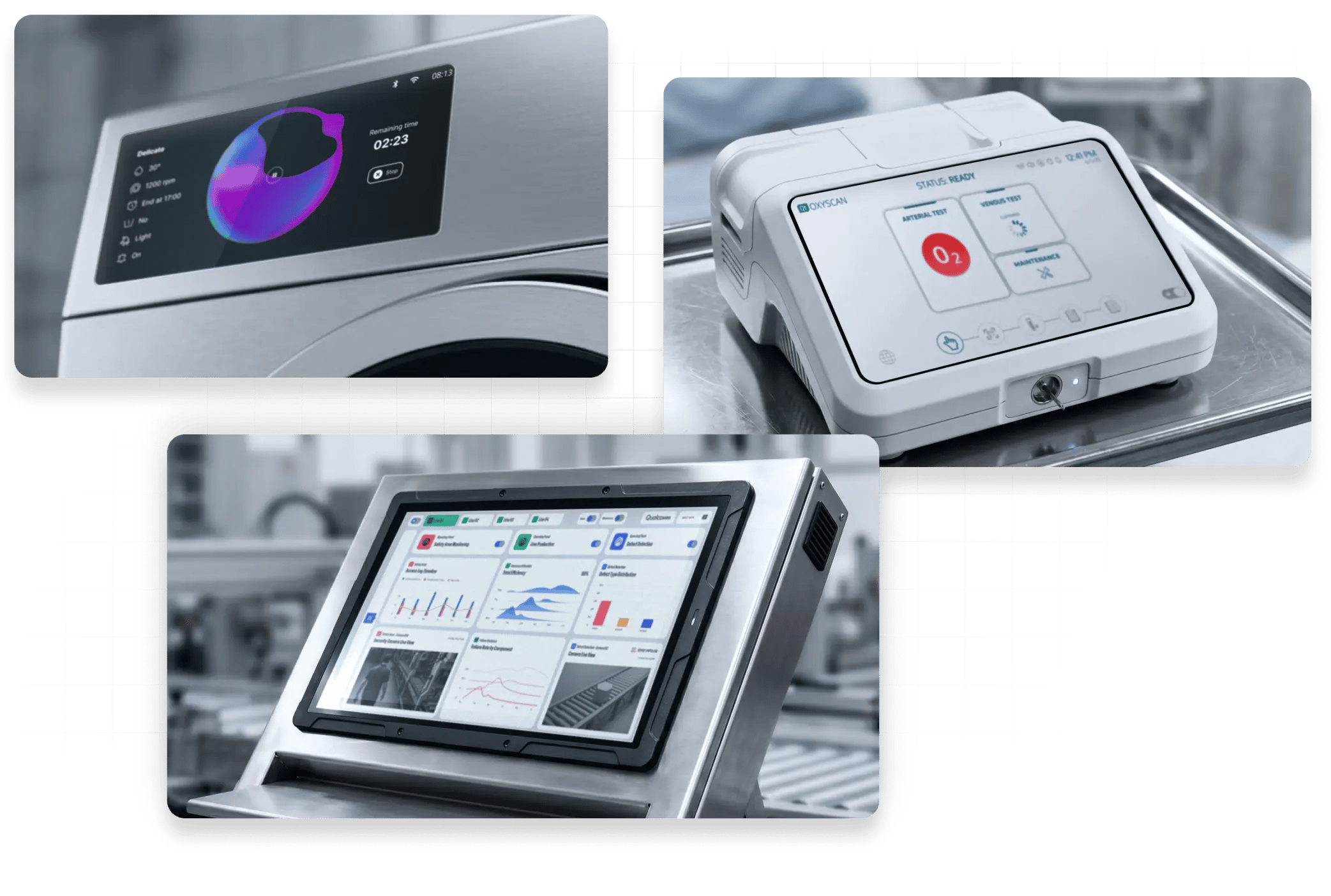
Three different GUI designs for a washing machine, a medical device, and an industrial automation screen, created in Figma and ported to the device with Figma to Qt.

FIGMA TO Qt

The Most Reliable Way to Bring Your GUI Designs from Figma to Device

Your design should reach the product looking the way you crafted it. Figma to Qt converts your Figma designs directly to code. Every export is a working QML project you previewed, verified, and approved right in Figma. Stay in control of the user experience, from first screen to final product.

Download For Free Contact Us

While Other Tools Import From Figma, Figma to Qt Works IN Figma

Figma to Qt runs inside Figma and is a dedicated conversion tool, not a generative one, so the output is predictable and reliable. What you sign off on in Figma is what the developer receives.


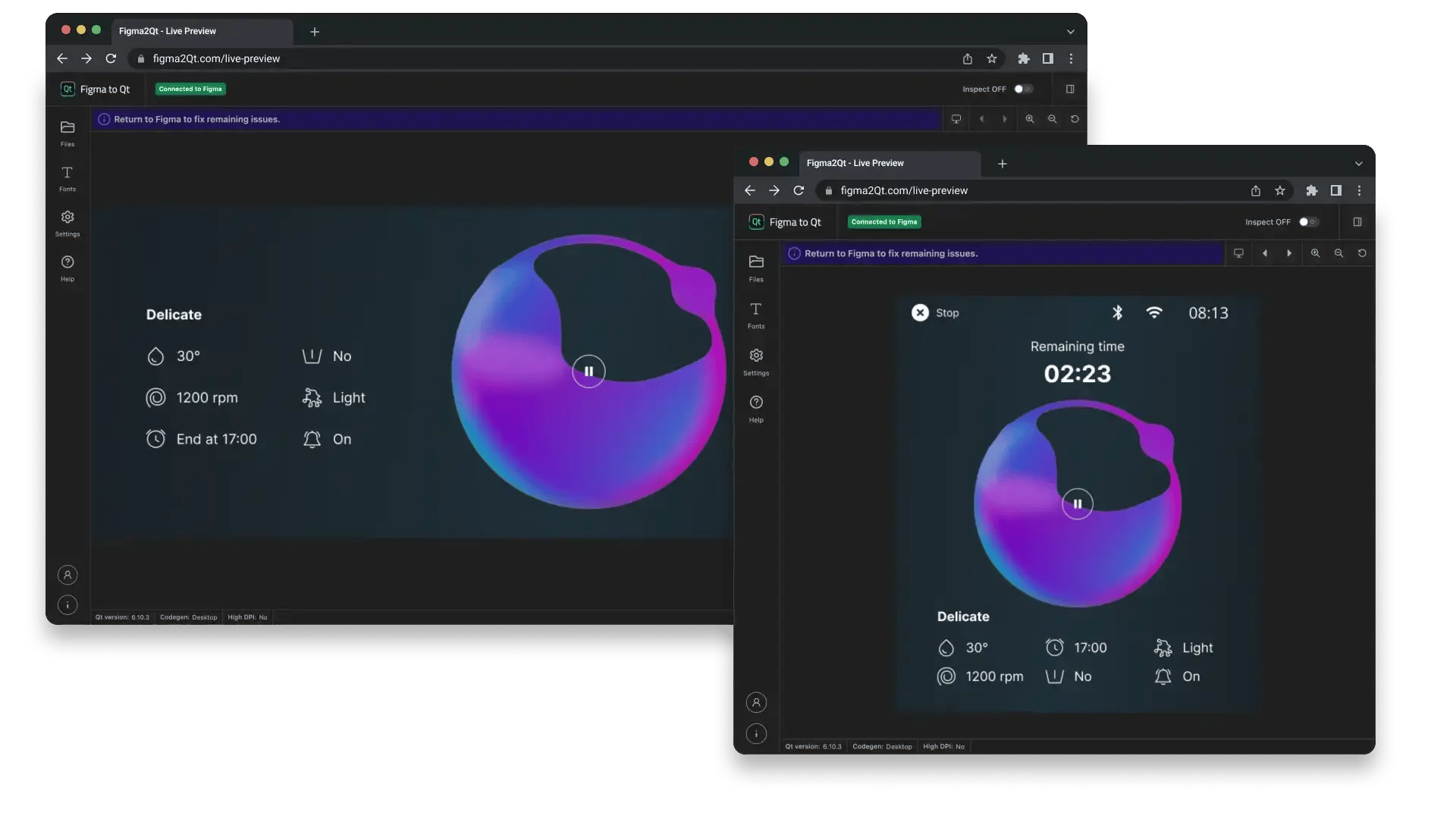
Live preview of GUI design at different screen resolutions in Figma's plug-in Figma to Qt.
See It Running Before It Reaches the Device

Your GUI Design, Live in the Browser Before It Leaves Figma

Figma to Qt previews your GUI design as a real, working interface in the browser. Not just a prototype, but the actual QML code that will run on the device.

Preview multiple screens, check them at your exact device resolution, and see how every design element maps to code. All from inside Figma, without switching tools or waiting for a developer.
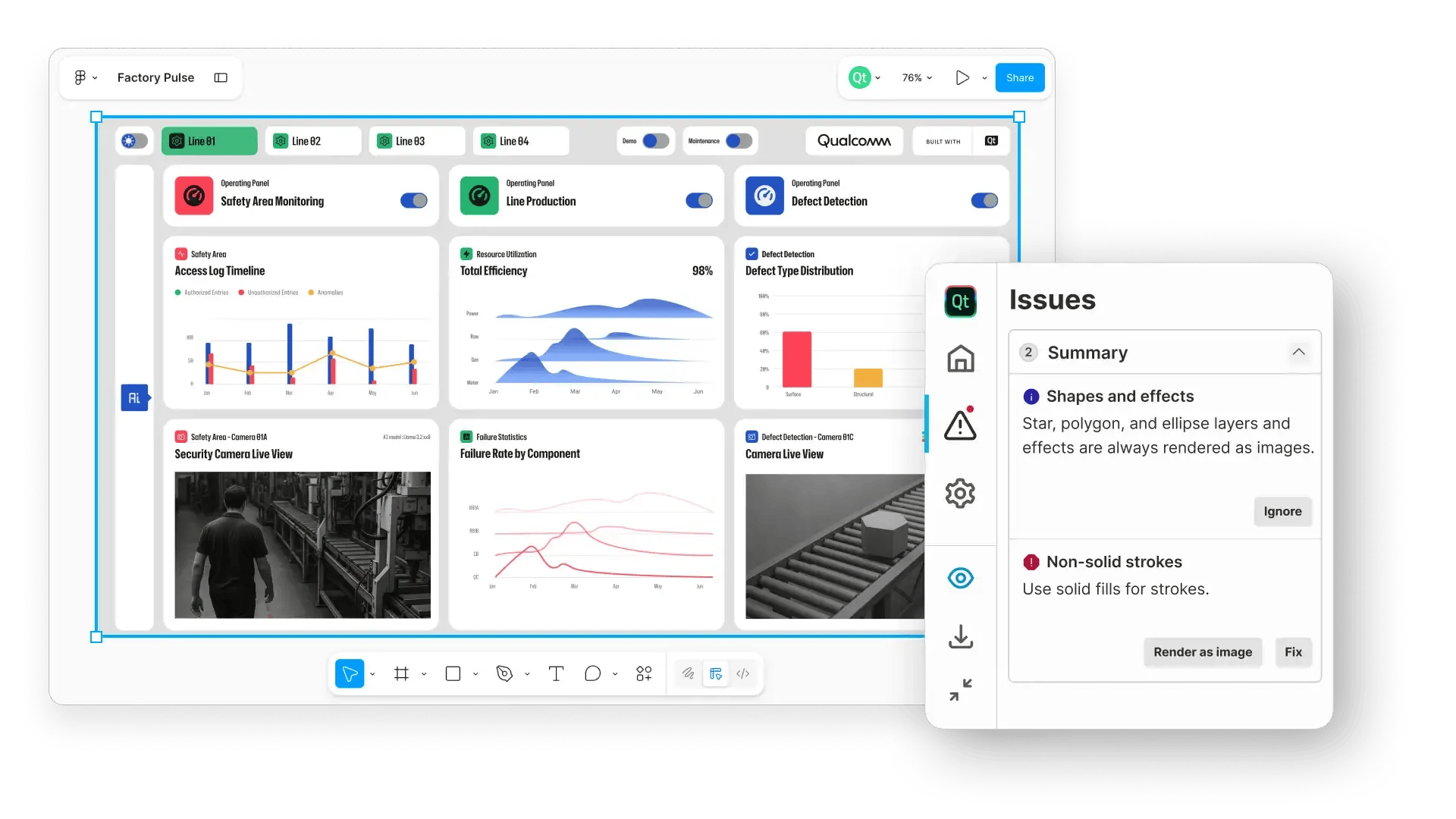
The issues tab of the Figma's plugin Figma to Qt, highlighting the issues with porting a GUI design to the device.
Know What Works as You Design

Design Your GUI Knowing What Will Run on the Device

As you build in Figma, the plugin checks your components and highlights anything that won’t translate smoothly to QML.

Potential problems show up early when they are still easy to fix, not after hours of work are already completed.

When something needs adjustment, you clearly see what it is and why. Often, you can fix it with just one click. You complete the design process with confidence and on time.
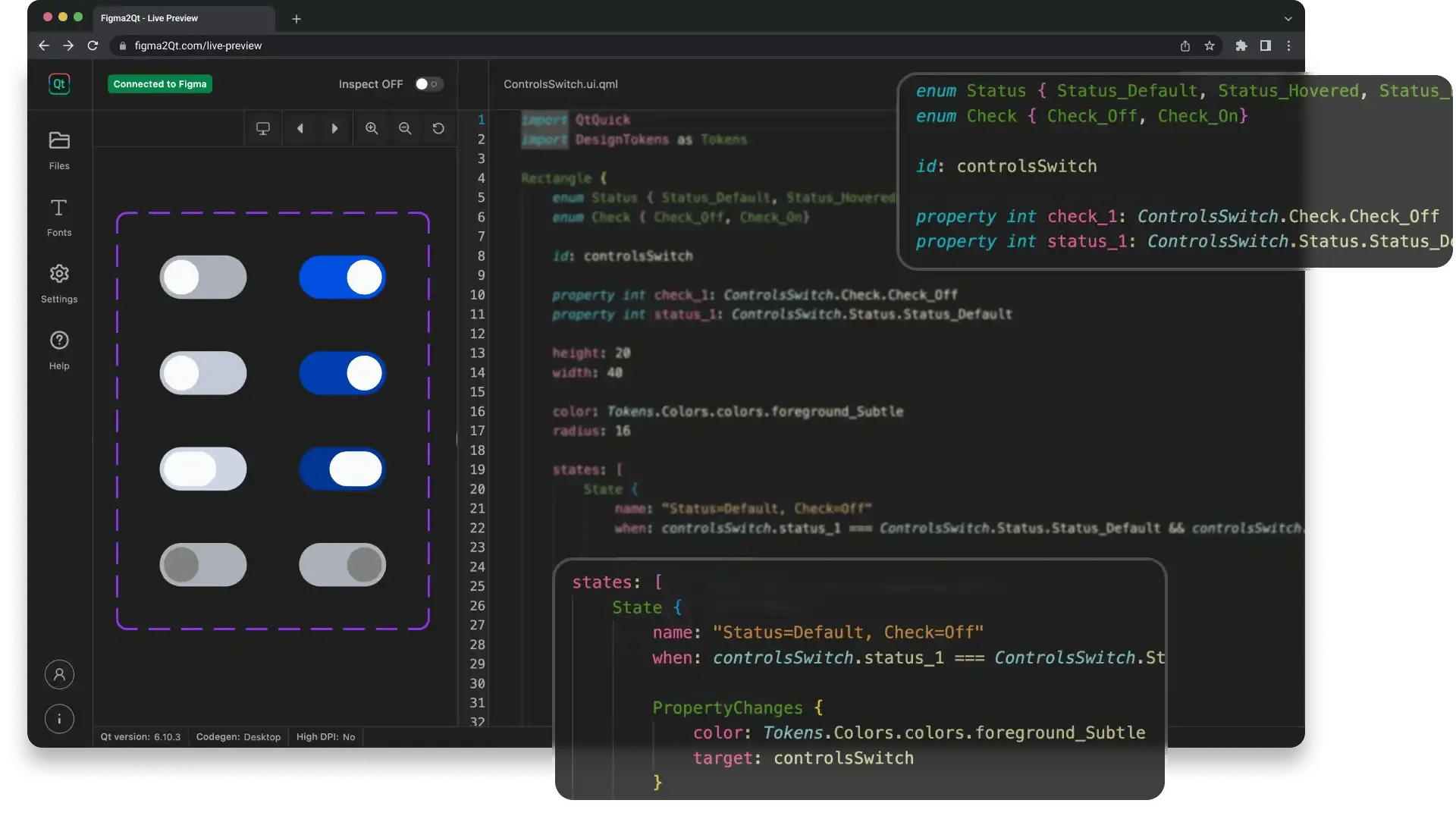
The QML code generated from your design system elements with the Figma's plug-in Figma to Qt.
Convert Your Figma Design to Code

Real, Working Code. Not Just Shapes for a Developer to Interpret.

Figma to Qt converts your GUI design into clean QML code that developers can open directly in Qt Creator, Visual Studio Code, or Qt Design Studio. No PDFs, no prototype links, no room for interpretation.

Your interactive components export as functional Qt Quick Controls, stable and tested. Your color and style decisions carry over as design tokens, keeping the code in sync with your design system.

Whether a developer or an AI assistant picks it up next, what they get is what you already signed off on.

Get started with Figma to Qt

Download the Plug-in and Start Bringing Your Figma Designs to Life

Download For Free Contact Us

Playground Project

Gain hands-on experience with the full Figma to Qt workflow using an actual washing medical pump infusion user interface.

Documentation

Check the full Figma to Qt documentation covering the whole workflow from Figma design to working QML code.

FAQ

Figma to Qt is available for free download from Figma Community. Check our Frequently Asked Questions to learn more about how it works.

What is Figma to Qt?

Figma to Qt is a plugin for Figma developed by Qt. It allows designers to create Figma designs for Graphical User Interfaces (GUIs) and Human-Machine Interfaces (HMIs) that are ready for deployment on the target embedded device. With Figma to Qt, designers are confident that their GUI design vision is delivered to the final product with minimal changes and iterations. 

How does Figma to Qt compare to AI tools that convert Figma designs into code?

Figma to Qt differs from AI tools that convert Figma designs into code in a few significant ways.

First, Figma to Qt works in Figma, so you can prepare, preview, and verify your design without ever leaving the environment you already work in.

Second, it is a fully supported product built specifically to convert Figma GUI designs into QML.

Finally, because Figma to Qt is a dedicated conversion tool rather than a generative one, the output you get is predictable and reliable: the QML code that you export reflects exactly the project you previewed, verified, and approved before export.

For example, Figma to Qt maps your components to Qt Quick Controls, stable and tested building blocks that developers already use in production Qt projects. That mapping does not change. Your team can rely on it across projects, designers, and releases.

How do I get Figma to Qt?

Figma to Qt can be downloaded from the Figma Community. It is free to try and use.

Is Figma to Qt Free?

Yes, Figma to Qt is free, and you only need a Figma license to download and use it.

However, you will need a Qt license to use the project exported from the Figma GUI design for development and deployment.

What Figma license do I need to use Figma to Qt?

You can use Figma plugins, including Figma to Qt, with any type of Figma license. You don't need a paid license to use Figma plugins available in the Figma Community.

Is Figma to Qt the same as the Qt Bridge for Figma?

Figma to Qt is the next evolution of Qt Bridge for Figma. It is a separate plugin with new and improved capabilities to prepare your GUI design for embedded devices.

If you are starting a new project, please download and use Figma to Qt.

If you have a project using Qt Bridge for Figma, you can get support via email or Qt Account Support Center until October 2030.

I am using Qt Bridge for Figma, do I get Figma to Qt automatically?

Figma to Qt and Qt Bridge for Figma are two separate plugins.

Figma to Qt features new and improved capabilities to prepare your GUI design for embedded devices, and it is available for download and use from Figma Community.

If you are starting a new project, please download and use Figma to Qt.

Qt Bridge for Figma is a legacy solution.

If you have a project using Qt Bridge for Figma, you can get support via email or Qt Account Support Center until October 2030.

Does Figma to Qt support automatic code generation in languages besides QML?

Figma to Qt generates QML code from your GUI design in Figma. We are exploring the possibility of making the code compatible with other languages after the release.

Do I need Qt Design Studio to use Figma to Qt?

No. The QML code generated by Figma to Qt can be used with Qt Design Studio or any Integrated Development Environment (IDE), including Qt Creator, Visual Studio Code, and others. Qt Design Studio is just one option.

What Qt version should I have to use Figma to Qt?

You do not need a Qt license to download and use Figma to Qt, but you will need a Qt license if you want to use the project exported from the GUI design. In that case, Figma to Qt will be supported starting from Qt 6.10.

Latest News on GUI Design

Embedded UI Design Has a Tool Problem. AI Alone Is Not the Fix.

The Bar For Embedded UI Design Has Been Set By The Phone In Your Pocke...

Read More

7 Years of HMIs: Here’s What I Noticed About UX/UI Best Practices.

Let me set the scene.

Read More

UI Animation Types in QML And When To Use Them

I wanted to write a blog post about UI animation types in QML for a wh...

Read More

Get started with Figma to Qt

Try Figma to Qt Now Contact Us